






Customized Template Showcase
Builds a highly customized template showcase system, deeply aligned with brand visual identity and cultural essence. Delivers enterprise core knowledge assets in a unified, professional format—efficiently and intuitively—ensuring precise audience reach, empowering business operations, and enhancing brand value.
Core Advantages
Real-time Collaboration and Customizable Presentation: Empowering Teams for Efficient Creation and Ultimate Experience
Boundless Collaboration, Unlimited Creativity
In an era where content reigns supreme, efficient content creation workflows and captivating presentation effects are the twin engines driving enterprise success. Traditional CMS systems often impose significant constraints on team collaboration and content presentation, resulting in low content creation efficiency and mediocre user experiences. Our BMS system completely resolves these pain points through its exceptional real-time collaborative editing capabilities and highly customizable presentation templates—empowering teams to create efficiently while delivering exceptional visual and interactive experiences to users.
Core Advantages
I. Real-Time Collaborative Editing
Seamless Team Collaboration, Accelerated Content Creation
Content creation is no longer a solo endeavor—it is the collective output of team intelligence. Our BMS system provides an intuitive yet powerful real-time collaborative editing feature, enabling content teams to collaborate with unprecedented efficiency:
Simultaneous Multi-User Editing: Multiple team members can edit the same article concurrently, viewing each other’s changes in real time—eliminating version conflicts and significantly boosting content production efficiency.
Version History & Rollback: Integrated with robust version control, teams can effortlessly track all modification history and instantly revert to any prior version—ensuring content security and traceability, making every change fully auditable.
Granular Permission Control: Fine-grained permission management ensures that team members of different roles access and operate only authorized content—safeguarding content security while optimizing collaboration workflows.
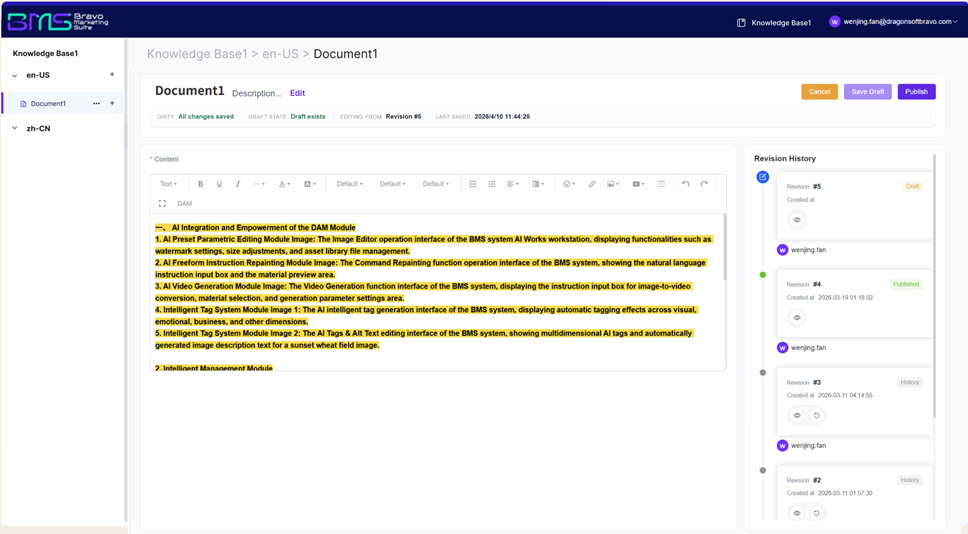
(Image: Knowledge Base Editing Interface)
II. Highly Customizable Presentation Templates
Shape Your Brand Identity Freely, Deliver Unique User Experiences
Content must not only be high-quality but also presented in the optimal way. Our BMS system offers rich, highly customizable presentation templates, allowing enterprises to flexibly design how knowledge content appears across diverse publishing channels and site branding styles—crafting truly unique user experiences:
Flexible Template Engine: The system features a powerful built-in template engine, enabling front-end developers to create and modify presentation templates using familiar web technologies—achieving pixel-perfect precision.
Multi-Channel Adaptive Design: Whether for responsive websites, mobile applications, WeChat Mini Programs, or other digital touchpoints, customized templates ensure optimal content display across all devices and platforms—enhancing consistency in user experience.
Brand Consistency Assurance: Unified template management guarantees that all published content strictly adheres to brand visual guidelines and design standards—maintaining a professional corporate image.
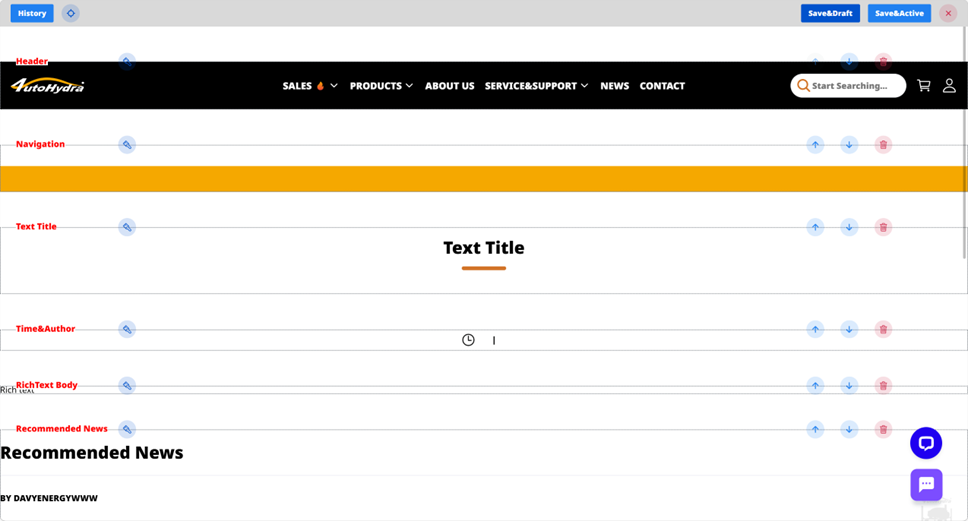
(Template Editing Interface)
III. No-Code Visual Editing
No-Code Visual Editing Enables Flexible, Efficient Template Modifications
Equipped with drag-and-drop visual editing, non-technical teams—including operations, marketing, and product staff—can easily modify template layouts, adjust element positions, and replace content assets—without requiring specialized development expertise. Real-time preview of modifications enables true WYSIWYG editing, facilitating rapid adaptation to evolving business needs and flexible fine-tuning of template details—reducing template maintenance costs and improving operational efficiency.
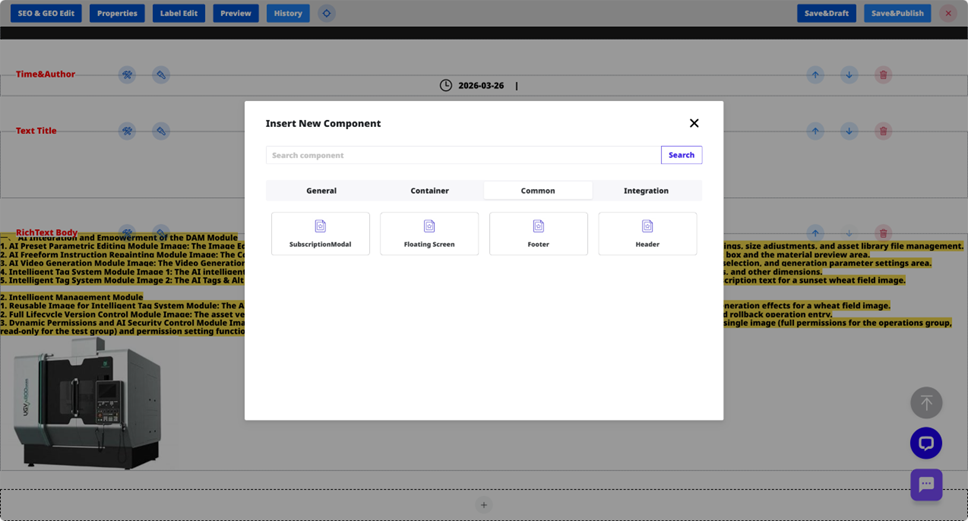
(Page Component Content Editing)
IV. Structured Engine Compatibility
Structured Template Design Optimized for SEO and GEO Engine Crawling
Templates employ structured layout design with built-in semantic markup and standardized code architecture—automatically optimizing content typography logic and keyword placement to enhance search engine crawler efficiency and improve organic rankings. Simultaneously, the design aligns with Generative Engine Optimization (GEO) parsing conventions, strengthening content structure and semantic clarity—making knowledge content more readily identifiable, citable, and discoverable by AI engines, thereby increasing content exposure.
Conclusion
Our BMS system dramatically enhances content team productivity and collaboration through real-time collaborative editing. Meanwhile, highly customizable presentation templates unlock limitless possibilities for content presentation—ensuring consistent brand identity and exceptional user experience. Choosing our CMS means selecting a powerful platform that empowers teams to create efficiently, adapt flexibly to market changes, and deliver outstanding content experiences to users—breathing greater vitality and competitiveness into your content within the digital world.
Frequently Asked Questions (FAQ)
Q1: How does real-time collaborative editing improve content creation efficiency?
A1: Our BMS system supports concurrent editing of the same article by multiple users, with real-time visibility of each other’s modifications—eliminating version conflicts.
Q2: What value do highly customizable presentation templates bring to enterprises?
A2: Highly customizable presentation templates allow enterprises to flexibly design how Fragments appear across different publishing channels and brand styles. This not only ensures optimal display across all devices and platforms—enhancing consistency in user experience—but also helps enterprises shape distinctive brand identities and deliver personalized content, thereby increasing user engagement and conversion rates.
Q3: How does our BMS ensure content security during collaboration?
A3: Our BMS employs granular permission management to ensure team members of different roles access and operate only authorized content. Combined with robust version control, all modifications are fully traceable and reversible to any prior version—securing content integrity while optimizing collaboration workflows.
Q4: How does Fragment architecture integrate with customized templates to achieve personalized content delivery?
A4: The Fragment architecture decomposes content into independent, structured units, while customized templates govern their presentation. Leveraging the structural nature of Fragments, the system dynamically loads and displays personalized content fragments based on user profiles, behavioral preferences, or specific contexts. Thus, the same content fragment can be rendered with distinct styling and layouts for different users or channels—delivering truly individualized, “one-size-fits-one” content experiences.

Want to know more about our products?
With years serving Fortune 500 clients, we offer flexible solutions and integrated implementation.
