






Omni-channel Digital Ecosystem Connector
Deeply connects enterprise business systems and digital ecosystems, enabling one-click synchronization and publishing of knowledge base content to official websites and pages. Seamlessly integrates with DAM digital asset libraries to ensure consistent styling and information integrity across all channels, comprehensively empowering efficient, standardized, and integrated omni-channel content operations.
Core Advantages
Omni-channel Digital Ecosystem Connector: Integrating Critical Systems to Empower Unified Content Strategy
Intelligent Knowledge Hub: AI-Powered Content Creation and Management to Build the Enterprise's Intelligent Brain
In the enterprise digital ecosystem, knowledge hubs, external sites (Site-Content), and digital asset management (DAM) systems often operate independently. This leads to fragmented content production, asset management, and page publishing processes—resulting in low efficiency and difficulty maintaining consistency. Our BMS system serves as a powerful, cross-domain digital ecosystem connector. Through deep API integration, it seamlessly connects the knowledge hub with DAM systems and various site publishing systems, establishing an efficient content operations framework built on the principle of "create once, associate across domains, update synchronously."
Key Advantages
I. Deep Integration with DAM Systems to Empower Rich-Media Creation
Access enterprise-wide brand assets instantly during creation to ensure compliance and consistency
Within the knowledge hub’s rich-text editor, creators no longer need to switch to the DAM system backend. Through the built-in integration module, they can directly search, browse, and insert digital assets already synchronized from the enterprise DAM system.
Visual asset panel: A dedicated DAM resources button appears in the editor’s sidebar, supporting category-, tag-, and keyword-based searches for images, videos, documents, etc., along with previews.
Ensure brand consistency: Every inserted asset originates directly from the DAM central repository, pre-approved by the brand department, and automatically carries the latest metadata and usage guidelines—eliminating at the source risks of using incorrect, outdated, or unauthorized assets.
Boost creation efficiency: No manual file downloads or uploads are required; resources are inserted via direct links or optimized reference code, dramatically streamlining the creation of multimedia knowledge content enriched with high-quality imagery and video.
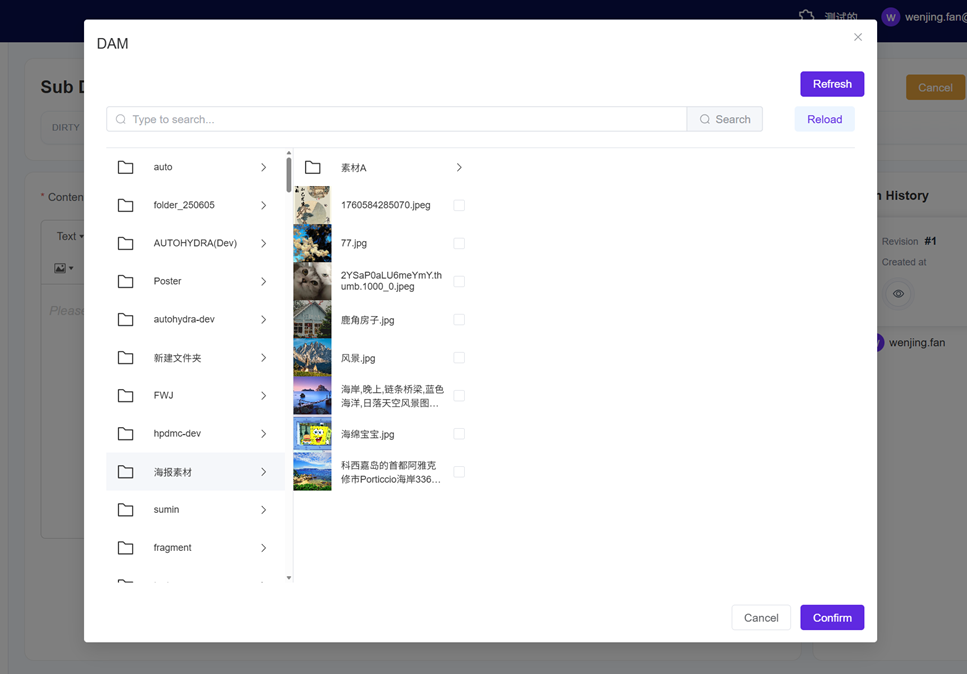
(Image alt text: Rich-text editor DAM selection dialog)
II. One-Click Publishing and Synchronization to Site Pages, Simplifying Publishing Workflows
Knowledge is content—publish directly to user-facing interfaces with one click
Content created or edited in the knowledge hub can be published directly to designated site pages through configuration—without requiring frontend developers to rebuild pages.
Multiple publishing modes: Supports "one-click publishing" to push content to predefined site channels or page locations; also supports "real-time synchronization" to ensure site page content always remains consistent with the master version in the knowledge hub.
Empower business units: Marketing, product, and customer support teams only need to maintain content in the knowledge hub to automatically update external sites—including official product pages, help centers, and blogs—greatly reducing dependence on technical resources and accelerating information time-to-market.
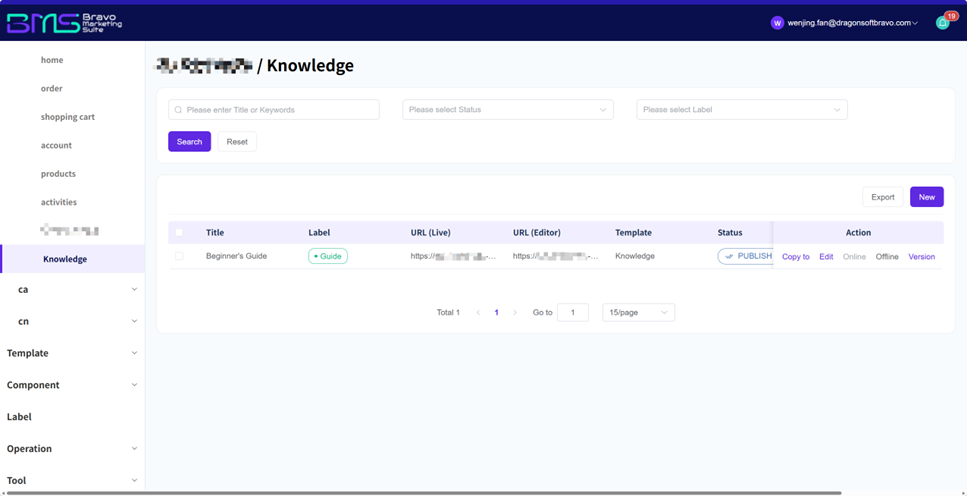
(Knowledge article page within a site)
III. Streamline Cross-Domain Content Operations Workflow to Enhance Overall Efficiency
Move beyond fragmented operations—focus on content strategy itself
This connector consolidates previously siloed workflows across three systems (DAM, knowledge hub, and individual site backends) into a single, cohesive, and efficient workflow.
Closed-loop workflow: During editing in the knowledge hub, creators fetch assets from DAM; upon completion, content is published to sites with one click. All operations occur either within a single platform or via highly automated processes.
Reduce collaboration overhead and errors: Minimizes cross-system communication, file transfers, and manual copy-paste steps—significantly lowering operational costs while avoiding human-induced issues such as version mismatches and broken links.
Empower content operations teams: Frees operations teams from tedious, mechanical publishing tasks, enabling them to focus more energy on higher-value activities—such as content strategy planning, quality enhancement, and performance analysis.
Conclusion
The "Cross-Domain Digital Ecosystem Connector" embodies the core value of the BMS system as an enterprise content hub. It not only incorporates professional DAM and site-building systems but—through its robust connectivity—transforms the knowledge hub into an intelligent nexus for content production and distribution. It ensures high-quality content and brand assets flow efficiently, accurately, and consistently from their origin to every user touchpoint. This significantly improves collaborative efficiency and publishing agility in content operations, while technically guaranteeing uniformity and professionalism across the enterprise’s entire digital experience—laying a solid, reliable foundation for digital content excellence.
Frequently Asked Questions (FAQ)
Q1: Which specific DAM systems and site publishing systems does this connector support?
A1: We adhere to an open-integration philosophy. For DAM systems, we typically provide standard connectors compatible with leading commercial DAM solutions and common cloud storage platforms. For site publishing, we offer comprehensive APIs, SDKs, and publishing plugins tailored for popular platforms and headless architectures. The supported list is continuously updated, and we also provide customized integration support for enterprise-developed or proprietary systems.
Q2: When publishing knowledge hub content to sites, how is page styling and layout controlled?
A2: Styling and layout control are achieved via "templates" and "components." During integration, frontend development teams build corresponding display templates or components on the site side for different knowledge hub content types (e.g., news articles, product descriptions, FAQ modules). When knowledge hub content syncs via API, it automatically renders using these predefined templates—seamlessly integrating into the site’s overall design language and layout structure, thereby decoupling content from presentation.
Q3: Can I update knowledge hub content without immediately syncing it to external sites?
A3: Absolutely. You retain full control. Typically, two modes are available: 1) Manual publishing mode: After editing in the knowledge hub, content syncs only upon manually clicking the "Publish to Site" button. 2) Workflow-controlled mode: You can define content states—for example, only content marked "Final Approved" auto-syncs. Flexible rule configurations allow precise control over timing and scope of publication based on content importance and sensitivity.
Q4: Does such deep integration risk excessive coupling between systems, compromising stability?
A4: Clear API contracts, asynchronous message queues, and robust error-handling mechanisms ensure that transient failures or maintenance of any single system do not render knowledge hub editing or site publishing functions entirely unavailable. The system provides failure retries, status monitoring, and alerting mechanisms to safeguard integration resilience. Moreover, this API-based integration approach makes future replacement or upgrade of either end feasible—protecting your enterprise’s technology investments.

Want to know more about our products?
With years serving Fortune 500 clients, we offer flexible solutions and integrated implementation.
