





Synology 9.8 Vulnerability Disclosed Over a Month Ago: Patch Released, Deployment Still Limited by Device Generation
Published : 2026-11-02
Author: William
Introduction
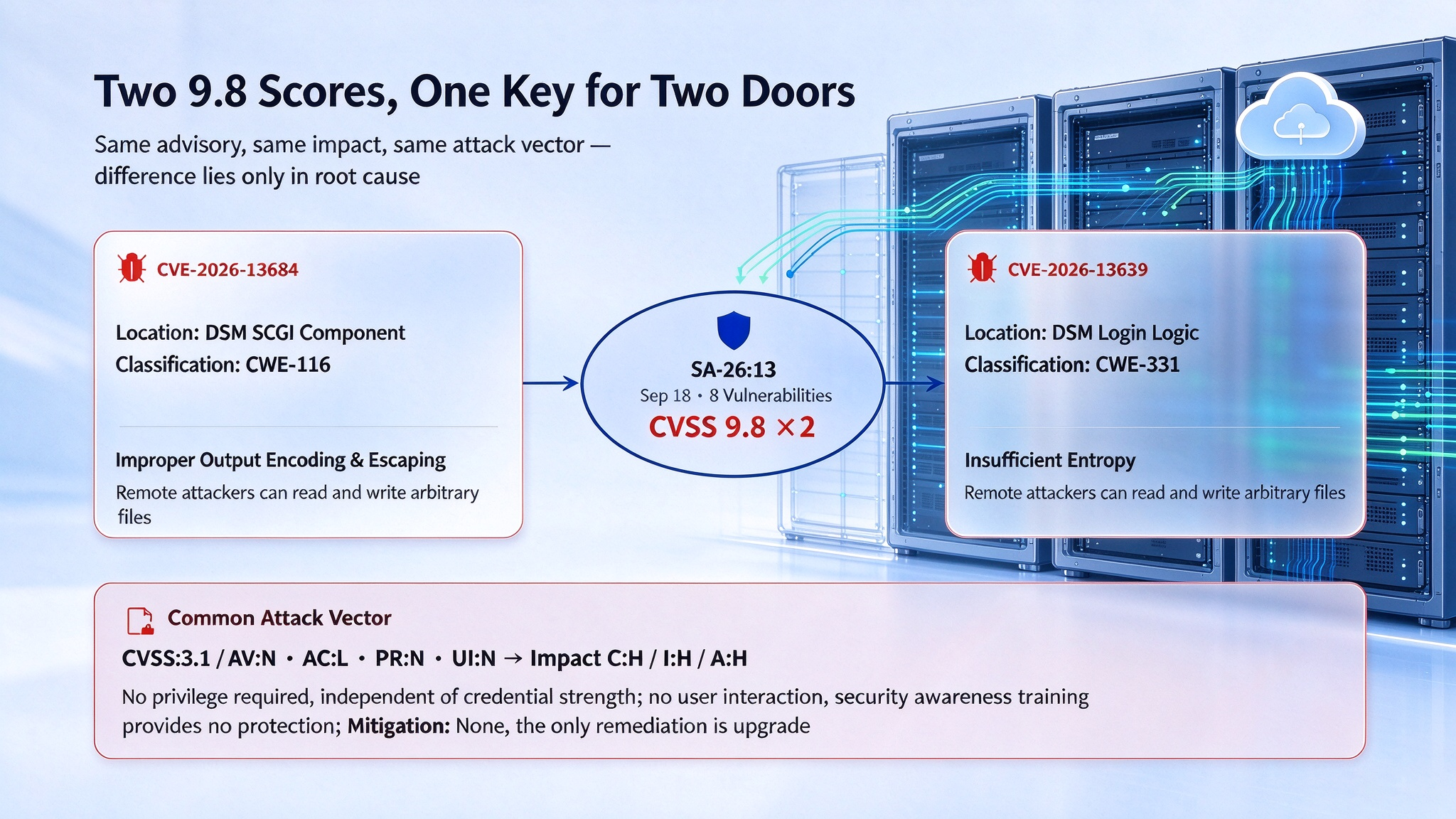
On September 18, Synology released security advisory SA-26:13, fixing 8 vulnerabilities at once. Two of them carry a CVSS 3.1 base score of 9.8.
The two identifiers are CVE-2026-13684 and CVE-2026-13639. As of October 29, more than a month has passed since the advisory was published. By the fixed versions it lists, devices that complete the upgrade are no longer affected by either vulnerability; whether the upgrade can actually be performed, however, depends on the version branch the device runs, and the support period for each branch is set separately under the software lifecycle policy.
The Two 9.8-Rated Vulnerabilities in Detail
The advisory is precise about how each one is classified. CVE-2026-13684 sits in the SCGI component of DSM and is classed as improper output encoding and escaping (CWE-116); CVE-2026-13639 sits in the login logic and is classed as insufficient entropy (CWE-331). The advisory describes the impact of both in identical terms: a remote attacker can read and write arbitrary files and cause denial of service.
(The image details the two 9.8-rated vulnerabilities)
Both vulnerabilities share the same vector: CVSS:3.1/AV:N/AC:L/PR:N/UI:N/S:U/C:H/I:H/A:H. Under CVSS 3.1 scoring rules, attack vector, attack complexity, privileges required, and user interaction already take their most severe values, so the gap between 9.8 and the maximum of 10.0 comes down to scope alone. If the impact could cross security domains, the same set of metrics would score 10.0.
This means exploitation carries no additional preconditions. “No privileges required” means the attacker needs no prior identity—the weakness is not in credential strength. “No user interaction required” means the attack does not depend on anyone opening a file or clicking a link, so security awareness training offers no protection on this path.
The Mitigation field in the advisory reads None. That field normally lists temporary workarounds, such as disabling a feature or adding filtering rules on boundary devices. A None entry means no configuration-level workaround exists; the only available remedy is an upgrade.
Fix Versions and Device Generation
The advisory provides four fixed versions: DSM 7.4-90075, 7.3.2-86009-4, 7.2.2-72806-9, and 7.2.1-69057-12. The four version numbers map to four maintenance branches of DSM 7.x, nominally covering the installed base.
The constraint lies in branch support deadlines. Under Synology’s software lifecycle policy, the maintenance phase for DSM 7.2 ended in December 2025, extended support for 7.1 ended in June 2025, and extended support for 6.2 ended in September 2024. As of October 2026, only 7.3 and 7.4 remain within the regular security update window.
A device’s physical service life and its operating system’s support cycle do not line up. Rack-mounted NAS units are typically depreciated over five years, yet eight to ten years of actual use is common, because the main components are disks: replacing a single drive keeps the unit running, so a full replacement is rarely warranted. A single major DSM version, by contrast, is supported for three to five years. Hardware still in service while software is past its support window—this gap is rarely factored into procurement decisions.
For devices on branches such as 7.1 or 7.2, the fixed version in the advisory and the support status under the lifecycle policy do not match. The device can install the patch, but no further updates after it are promised.
An Exceptional Patch Backport
One backport by Synology indirectly confirms the size of the installed base.
On October 22, Synology published a public statement on two high-severity PHP vulnerabilities (CVE-2026-109618 and CVE-2026-109619). The statement said that, after an investigation by its Product Security Incident Response Team, the impact of PHP2Shell is confined to systems running certain PHP dependent packages, and it listed the affected packages: Calendar, IDrive, Joomla, KodExplorer, MailStation, MediaWiki, phpMyAdmin, vtigerCRM, Web Station, and WordPress.
On the day the statement was published, the PHP security update covered DSM 7.4 and 7.3. The statement was then revised twice: on October 28 to add DSM 7.0 and 7.1, and on October 29 to add DSM 6.2.
All three versions had already been listed by Synology as end-of-life. Backporting a patch to a version no longer maintained is exceptional, and the need for it shows that the number of devices still running those versions has reached a scale that cannot be ignored. The exception is also selective: a single component’s patch can be backported, but the advisory makes no comparable commitment that the fixes for all eight vulnerabilities in SA-26:13 reach every branch.
The same statement draws one further distinction. It says that the PHP component built into DSM serves internal systems and, by design, contains no externally accessible modules; there is therefore no exposure surface, the risk is assessed as minimal, and fixes are scheduled only for later DSM releases. For users, “the device is on the latest version” and “PHP has been patched” thus become two separate states that have to be confirmed independently.
From File Storage to Application Host
The extension of the patch scope to 6.2 relates to what these devices actually do in an enterprise.
NAS was originally positioned as file storage. Once deployed, its role often expands: the device stays online, offers a web management interface, and accepts package installation, so it ends up hosting internal knowledge bases, public-facing sites, or media libraries. Compared with requesting a dedicated server, this route is cheaper and faster to approve in small and mid-sized organizations.
That list of affected packages happens to record how far this expansion has gone. By function it covers website building (WordPress, Joomla), knowledge bases (MediaWiki), database administration (phpMyAdmin), file browsing (KodExplorer), customer relationship management (vtigerCRM), and mail and calendaring (MailStation, Calendar). Systems of this kind belong, in a properly governed deployment, on dedicated servers maintained by specialist staff; in practice they often sit on a storage device managed alongside other duties by administrative or part-time staff.
Once a device runs PHP, its security posture is bound to the state of the PHP ecosystem as a whole. On October 21, 2026, the PHP project fixed two unauthenticated remote code execution vulnerabilities rated 9.2 under CVSS v4.0; W3Techs data from the same day put PHP at 69.3% of websites that use a known server-side programming language, of which 34.8% run on branches the project no longer updates (PHP 7 at 27.0%, PHP 5 at 7.7%). PHP instances on storage devices form part of that 34.8%, and they usually fall outside website asset inventories and application security testing scopes.
Update channels are not unified either. Packages arrive through Package Center, while the runtime ships with system updates, and the two differ in release cadence and in when changes take effect. In the PHP2Shell statement, Synology notes that dependent packages restart automatically once the PHP update completes, whereas MailStation has to be updated by hand. The detail shows that even an administrator who has run the update still has to confirm the state of each dependent component.
The difficulty of after-the-fact investigation is more immediate still. Such devices usually have audit logging switched off, or keep logs locally for only a few days. Both 9.8-rated vulnerabilities in SA-26:13 allow writes to arbitrary files, and at the file-system level such writes leave no anomalous signature. Incident handling follows a fixed order: establish whether a compromise occurred, decide whether a reporting obligation is triggered, and only then clean up and restore. Once the records are overwritten, the first step cannot be completed.
The Limits of RAID and the Independence of Backups
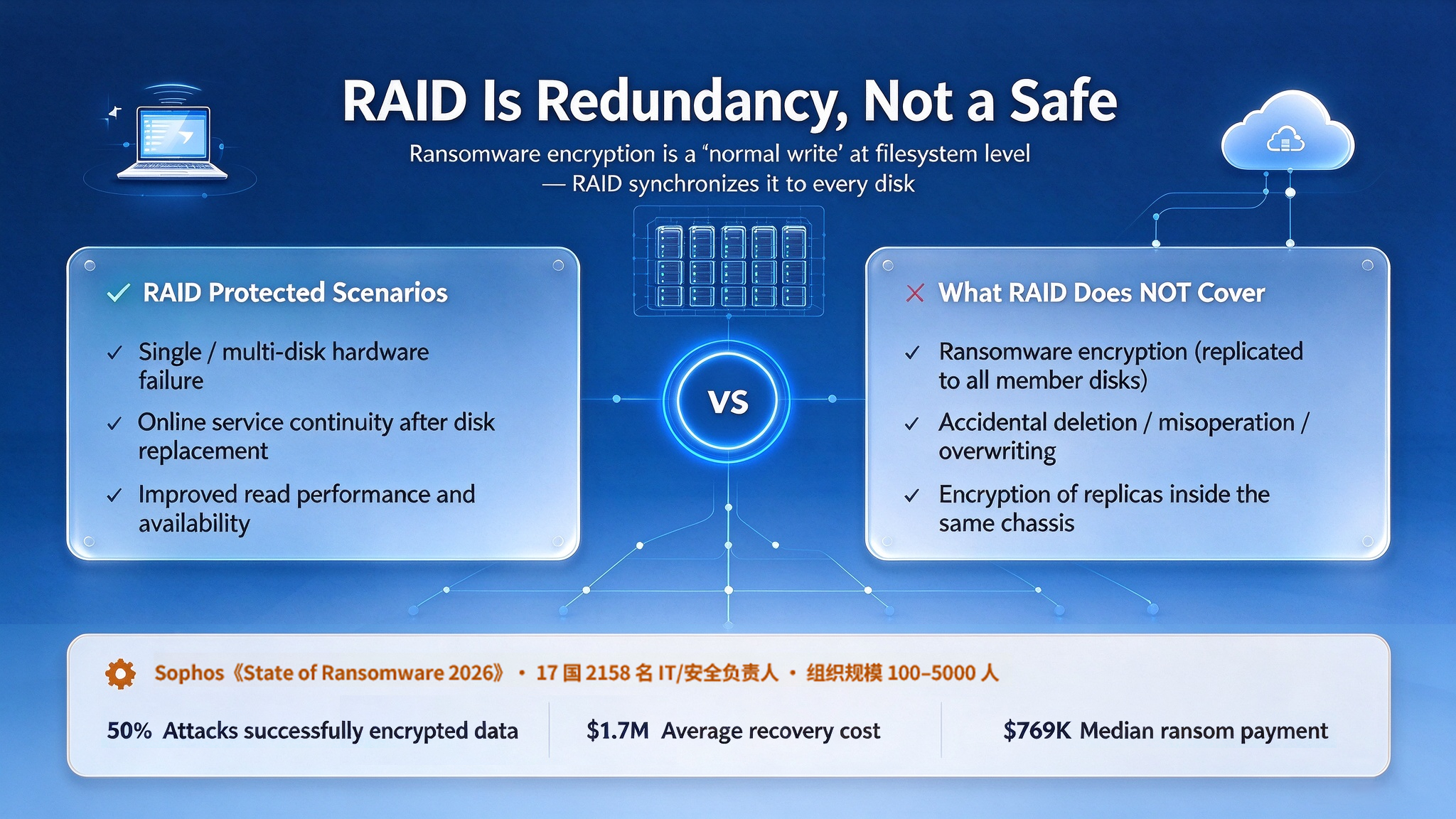
A common misconception about self-built storage is to treat RAID as a guarantee of data safety. RAID guards against disk failure; it does not cover encryption, accidental deletion, or operator error. Ransomware encryption looks like ordinary writes at the file-system level, and RAID replicates it to every member disk.
Sophos’s “State of Ransomware 2026” offers a cost-side reference. The report is the seventh edition in the series, based on a survey run from January to March 2026 among 2,158 IT and security leaders in 17 countries, at organizations of 100 to 5,000 employees. Its figures: 56% of attacks succeeded in encrypting data, average recovery cost was US$1.7 million, and the median ransom payment was US$769,000.
The link between these figures and self-built storage is the homogeneity of backups. If production data and backups sit on the same device, the encryption process makes no distinction between them. A backup is only as good as its isolation from production, in both physical and permission terms; a copy inside the same chassis fails that test. The most common setup in small and mid-sized organizations is exactly one device serving as both production storage and backup.
(The image illustrates the limits of RAID and the independence of backups)
Two Kinds of Management Need: From Storage to Assets
Even with all of the above handled—the device on a supported version, no web applications hosted, backups deployed independently—the management capability NAS offers is still limited to directories and permissions, that is, to controlling who may access a directory and read or write it. That model can answer whether a file can be opened; it cannot answer whether the asset is correct.
Brand asset management sits on a different dimension. Take a single key visual. The questions it raises include: how many revisions the published version went through, and who approved them; the territories and term covered by the asset’s license; where the same asset appears across multilingual sites, e-commerce platforms, and offline materials, and how far a single change propagates; and which assets external partners may access, at what downloadable specifications.
These questions describe the attributes and state of an asset, not where it is stored. A directory structure serves manual retrieval; it does not carry rules. One practical test: at the last brand identity update, how long did it take to replace the asset across every site and every piece of collateral, and who signed off on completion? If assembling that answer takes several parties, the assets are still at the file management stage.
Digital Asset Management (DAM) is designed for exactly this scope. Versions are traceable: any published asset on any channel can be traced back to a specific revision and approval record. Rights have a term: assets whose license has expired are flagged by the system. Permissions are tiered: what external parties may access, at what file specification, is set by rule. Channels stay in sync: when a key visual changes, the references on every site change with it.
One Vendor’s Approach
Among domestic vendors offering such products, Dragon Bravo Corporation offers BMS DXP, a digital experience platform whose digital asset management module is BMS-DAM.
According to the company’s public information, BMS-DAM uses federated management: it can connect to a company’s existing Alibaba Cloud, Tencent Cloud, AWS, or Azure object storage without requiring legacy assets to be migrated into the vendor’s own storage. For an enterprise with years of accumulated assets measured in terabytes, that bears directly on implementation time.
The platform does not run on PHP; its backend is Java 21 with Spring Boot and its frontend is Vue3 with Nuxt, and the company maintains security patches for the open-source components on all three tiers itself. Delivery options include SaaS, dedicated cloud, and on-premises deployment.
Its boundaries deserve a note. DAM does not manage NAS patches and does not replace backup; its scope is where brand assets are stored and the rules that govern them. For devices affected by these vulnerabilities, the remedy remains upgrading DSM or cutting off public internet access.
Where Responsibility Sits
The remediation path for SA-26:13 is clear: the patch is published, and devices that complete the upgrade are no longer exposed.
What persists is the question of responsibility. Organizations usually name an owner for servers, sites, and endpoints; responsibility for keeping storage-device software current is rarely assigned. The device runs quietly and is touched seldom, so asset inventories tend to class it as infrastructure rather than a system needing ongoing maintenance—until an advisory reveals that the version it actually runs is past its support window.
The affected-product table in the advisory lists upgrade paths only for the four DSM branches 7.4, 7.3, 7.2.2, and 7.2.1, with no separate guidance for earlier branches. For users, three facts can be confirmed: the fixed versions are listed, some branches are no longer supported, and the reach of exception patches is decided by the vendor case by case.


Want to know more about our products?
With years serving Fortune 500 clients, we offer flexible solutions and integrated implementation.
