





AEM Dynamic Include Combined with Cloudflare ESI: Building a Global Brand Website with Ultimate Performance
Release Date: 2026-07-31
Author: Deng Chong
I. Introduction
For a brand’s official website targeting global users, “speed” is never optional—it is the lifeline. According to Google research data, increasing page load time from 1 second to 3 seconds raises bounce rate by 32%; every 100-millisecond improvement in speed boosts e-commerce conversion rate by approximately 1% [1].
Take the official website of an international law firm as an example—it typically exhibits the following characteristics:
Multi-language & Multi-region: A single site must support multiple language versions—e.g., Chinese, English, Japanese, German, Spanish—and serve visitors worldwide;
Frequent Content Updates: Insights on trending topics, media coverage, and attorney team updates change almost daily;
Complex Page Structure: Highly reusable modules—including headers, footers, breadcrumbs, “Related Insights,” and “Related Attorneys”—are often dynamically aggregated and rendered server-side;
High Brand Experience Requirements: First-screen load speed directly impacts customers’ perception of the brand’s professionalism.
In the classic Adobe Experience Manager (AEM) architecture, pages are served via full-page caching at the Dispatcher layer. However, once a page contains “dynamic components”—e.g., a “Related Insights” list that must be aggregated in real time based on current page context—the only two conventional approaches are:
1. Disable full-page caching: Each request hits the AEM Publish instance for rendering—causing severe performance degradation;
2. Load dynamic sections asynchronously via Ajax on the frontend: Causes first-screen flicker, harms SEO, and fragments user experience.
Is there a third way? Yes: AEM Dynamic Include (SDI) + Cloudflare ESI. This combination enabled us to implement an architecture of “edge-cached main page + edge-assembled dynamic fragments” on a global law firm’s official website, achieving stable millisecond-level global first-screen TTFB.
II. Technology Selection: Why SDI + Cloudflare ESI
Edge Side Includes (ESI) is a server-side include markup language executed at CDN edge nodes. HTML pages may embed tags such as:
<esi:include src="/content/.../header.nocache.html" onerror="continue"/>
When a CDN node returns a page to a user, it parses this tag at the edge, issues a subrequest to fetch the fragment content, and inline-assembles the fragment into the main document at the edge before returning the complete response to the browser. The browser receives a fully assembled, indistinguishable HTML document.
Sling Dynamic Include (SDI) is an open-source Apache Sling component that intervenes during AEM rendering: for components marked as “dynamic,” it renders no content directly but outputs ESI placeholders instead. SDI supports three inclusion types:
| Type | Execution Location | Characteristics |
| SSI | Apache / Dispatcher | Traditional approach relying on Apache mod_include; cannot leverage CDN edge capabilities |
| ESI | CDN Edge Node | Fragments can be independently cached by CDN; assembled at edge; enables global acceleration |
| JSI | Browser (Ajax) | Causes blank-screen flicker and harms SEO |
The key advantage of choosing ESI is that dynamic fragments themselves can also be independently cached by the CDN—main pages and dynamic fragments each maintain independent cache policies and invalidation rules—a capability unavailable in SSI-based solutions.
Traditionally, ESI has been a premium feature of commercial CDNs like Akamai. While Cloudflare does not natively support the ESI protocol, its Workers serverless compute platform—combined with TransformStream’s streaming processing capability—enables high-performance ESI parsing at the edge. Leveraging Cloudflare’s global network of 300+ edge locations, Worker subrequests can directly hit edge caches, resulting in significantly lower costs than traditional commercial ESI solutions.
III. Architecture Overview
The end-to-end request flow is as follows:

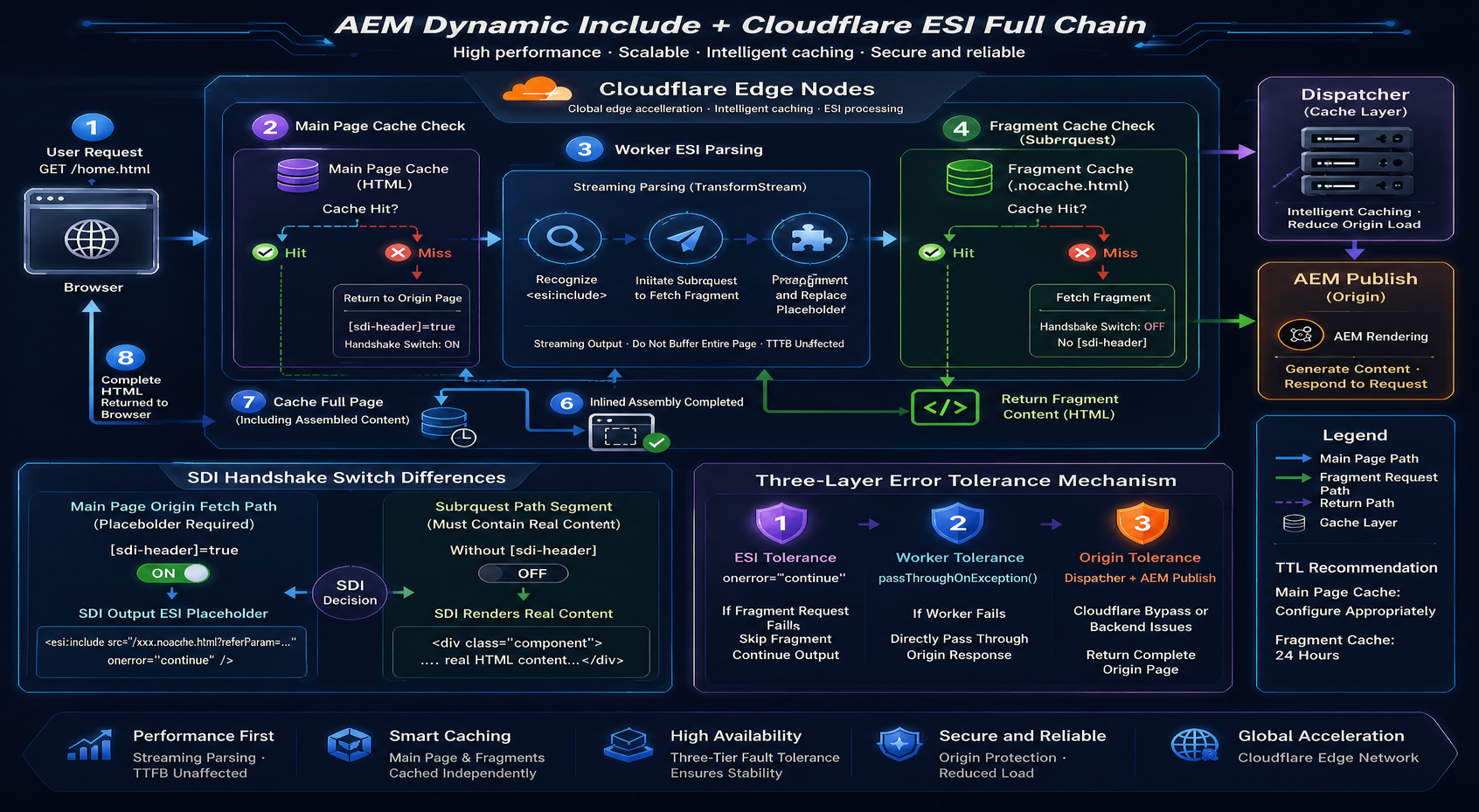
(Diagram illustrating the complete AEM Dynamic Include + Cloudflare ESI workflow)
Key Design Points:
1. Main Page: Full HTML is cached at both Cloudflare edge and Dispatcher layers; the vast majority of requests never reach AEM;
2. [sdi-header] Handshake Switch (example name): When Cloudflare fetches the main page, it injects this request header; only then does SDI output ESI placeholders. Workers intentionally omit this header when issuing fragment subrequests, causing SDI to render actual component content—this single header cleanly distinguishes between “placeholder mode” and “real-content mode”;
3. Dynamic Fragments: Exposed as distinct URLs using the .nocache selector, independently cached at Cloudflare edge (TTL: 24 hours);
4. Streaming Assembly: Workers use TransformStream to process page chunks incrementally—no full-page buffering—ensuring TTFB remains virtually unaffected.
IV. Implementation in Practice
4.1 AEM Side: SDI Configuration
Embed the SDI bundle into the ui.apps package for installation. This project uses a customized community edition version 3.3.x, extended with two critical capabilities: required_header (handshake switch) and referParam (context passing).
SDI configuration operates at the resourceType granularity—specifying which components undergo dynamic inclusion. Under the config.publish runtime mode, over 30 components were individually configured.Core configuration parameters include:
include-type="ESI": Outputs <esi:include> tags for edge-side assembly by CDN;
selector="nocache": Fragment requests use the .nocache.html selector to differentiate from main page URLs, enabling separate cache policy management;
add_comment="true": Embeds <!-- SDI include (path: ...) --> comments in output for immediate troubleshooting visibility;
required_header (custom extension): Configures a predefined header name (denoted here as [sdi-header]); SDI outputs ESI placeholders only when this header is present in the request. Standard Dispatcher-direct requests still return fully rendered pages, while only CDN-processed traffic (with explicit header injection) receives placeholder versions—ensuring safe, granular canary releases and rollbacks;
referParam (custom extension): Automatically appends the current page path as a query parameter to fragment URLs, allowing fragment components to determine “which page they are embedded within” during rendering—essential for context-sensitive components such as “Related Insights” and “breadcrumbs.”
Configuration covers over 30 components including navigation, breadcrumbs, related insights, related attorneys, homepage banners, and key contacts.
Taking the homepage as an example, after SDI intervention, AEM outputs HTML where dynamic component positions become:
<div class="dynamic-container ...">
<!-- SDI include (path: /content/experience-fragments/<site>/<locale>/header/.../dynamic-container.nocache.html?referParam=/content/<site>/<locale>/home.html, resourceType: <project>/components/content/dynamic-container) -->
<esi:include src="/content/experience-fragments/<site>/<locale>/header/.../dynamic-container.nocache.html?referParam=/content/<site>/<locale>/home.html" onerror="continue"/>
</div>
Note that the header navigation originates from Experience Fragment, meaning all pages across the site share the same header fragment URL—the entire site’s header is cached only once. Updating the navigation invalidates the edge cache once, enabling immediate site-wide effect.
4.2 Cloudflare Side: Worker ESI Engine
The core responsibility of the Cloudflare Worker: intercept the response stream → identify <esi:include> tags → issue sub-requests → inline-replace fragment content → stream output to users.
Streaming parsing is critical for performance. The Worker uses TransformStream to process the response stream in chunks rather than loading the entire page into memory. The parser splits the HTML tag stream at < and > boundaries; upon matching an esi:include tag, it extracts the src attribute to issue a sub-request, then inline-replaces the returned fragment content before continuing to stream to users. Thus, the first byte flows to the browser with near-zero latency, and TTFB remains unaffected by assembly logic. In case of Worker exceptions, passThroughOnException() directly falls back to the origin, ensuring availability.
Fragment edge caching. Sub-requests are forced through Cloudflare’s edge cache via cf attributes, with a TTL of 24 hours. Since fragments such as headers, footers, and breadcrumbs are shared across massive numbers of pages site-wide, a single edge cache hit for a fragment means all referencing pages avoid re-fetching from AEM for 24 hours, reducing Publish actual load to single-digit percentages.
Differential handling of headers. This is the most easily overlooked yet decisive step in the entire architecture. SDI outputs ESI placeholders only when requests carry the agreed-upon header; therefore, Cloudflare mustapply differential handling to two request types:
Main page origin fetch: Inject the [sdi-header]=true header so AEM outputs pages containing ESI placeholders. This can be done by constructing a new Request with the header injected before the Worker’s origin fetch, or configuring a Cloudflare Transform Rule to add it uniformly. Main pages cached at the edge must be the “placeholder version”; otherwise, the Worker will find no ESI tags upon cache hits.
Fragment sub-requests: Deliberately omit this header, carrying only an identifying User-Agent. When SDI detects the absence of the agreed header, it renders component content directly; the Worker thus receives ready-to-inline HTML fragments. This also prevents nested dynamic components within fragments from being replaced again with placeholders, avoiding uncontrolled multi-level ESI recursive parsing at the edge.
4.3 Implementation Pitfalls
1. Redundant referParam causing cache fragmentation. In the original implementation, referParam carried full page paths, generating N distinct fragment URLs when the same header fragment was referenced by N different pages—causing cache key explosion. Optimization: For context-agnostic fragments (e.g., Experience Fragment headers/footers), truncate referParam to the language level; under the same language version, maintain only one cached header fragment entry.
2. Context-sensitive components must not be truncated. Components like “Latest Insights” and “Media Center” rely on the full referParam for contextual aggregation; truncation causes content corruption. Final solution: Whitelist these two path types to exempt them from truncation, preserving full page paths.
3. Multi-layer fault tolerance. <esi:include onerror="continue"> ensures skipping—not erroring—upon fragment fetch failure; Worker’s passThroughOnException directly passes through to the origin upon self-exception; the required_header mechanism guarantees that, under extreme conditions, removing the Cloudflare layer still allows full rendering via Dispatcher + AEM, delivering zero functional loss. All three layers of fallback are indispensable.
V. Case Study: Global Site Deployment Effectiveness for an International Law Firm
Take the global website of an international law firm as an example. This site is a typical AEM global brand site: multilingual (Chinese/English/Japanese), featuring high-frequency-updated sections including insights articles, attorney teams, practice areas, and media center, with visitors spanning Asia-Pacific, Europe, and the Americas.
Pain points pre-optimization:
l Dynamic rendering of header navigation, footer, “Related Insights”, etc., resulted in low full-page cache hit rates;
l High latency for overseas users accessing the origin server (deployed in a single region);
l Coarse-grained cache invalidation post-content-publishing triggered origin storms during full-site refreshes.
Post-optimization results:
| Dimension | Result |
| Main page caching | Full-page staticization, dual-layer caching via Cloudflare Edge + Dispatcher, enabling global nearest-edge hits |
| Dynamic fragment caching | Headers/footers shared site-wide per language dimension at the edge, TTL 24h |
| Origin pressure | AEM Publish rendering QPS reduced by over one order of magnitude |
| Content publishing | Independent invalidation for fragments and main pages; navigation updates take effect globally within seconds |
| Global access | Leveraging Cloudflare’s 300+ nodes, TTFB for first screen in Europe/Americas and Asia-Pacific enters millisecond range |
| Availability | Worker exception passthrough + onerror fault tolerance + full-page rendering fallback, triple-layer fallback |
Users always receive complete, fresh, and ultra-fast HTML—the page body is fully cached as static content, while dynamic modules are assembled at the edge, imperceptible to browsers.

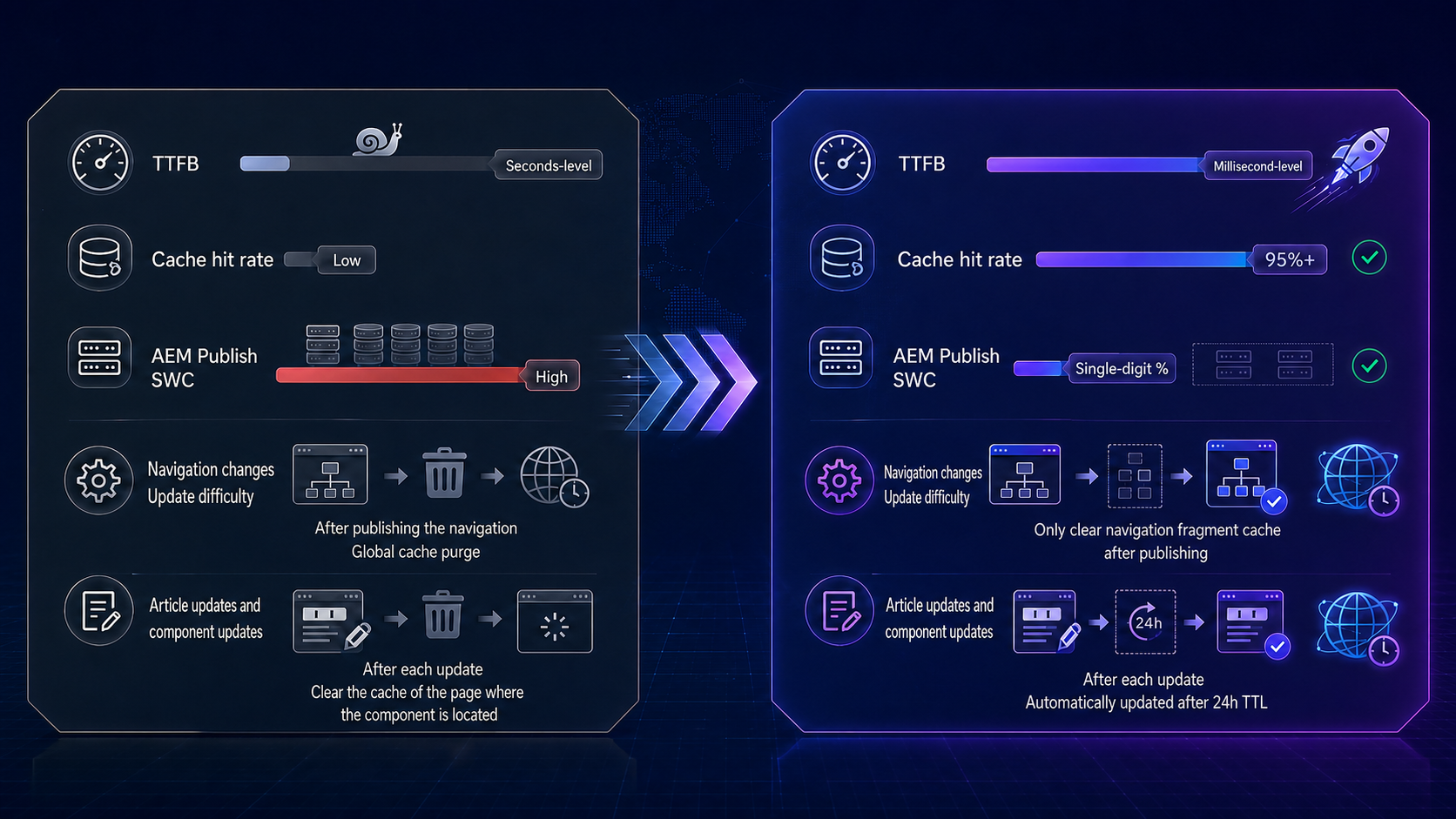
(Image shows comparative performance improvement visuals)
VI. Common Issues and Troubleshooting
| Phenomenon | Possible Cause | Troubleshooting & Resolution |
| View Source reveals no <!-- SDI include --> comment | Cloudflare failed to inject the agreed header during main page origin fetch; or the “full-rendered version” polluted the cache | Verify SDI activation by directly curling the origin with curl -H "[sdi-header]: true" <URL>; check header injection configuration; clear cache and retry |
| Entire block missing from page | Corresponding fragment sub-request failed and was silently skipped due to onerror="continue" | Directly request the fragment URL (.nocache.html path) to check HTTP status code; verify SDI-configured resource-types match the component’s actual resourceType |
| Certain block never updates | Fragment edge cache (24h TTL) has not expired | Purge the fragment cache precisely by URL in Cloudflare; integrate fragment cache purging into critical release workflows |
| All site pages display identical content in one location (e.g., B page’s breadcrumb appears on A page) | referParam incorrectly truncated, causing cache key collision for context-sensitive components | Review referParam truncation logic and whitelisting; context-sensitive components must retain full page paths |
| Page returns nested <esi:include> tags exposed raw to users | Fragment sub-request erroneously carried the agreed header, causing internal components to be replaced again with placeholders | Confirm fragment requests omit this header (carrying only an identifying UA) |
Three Universal Troubleshooting Steps:
① Inspect the Publish raw response—the SDI comments output by add_comment are the primary diagnostic clue;
② Segment requests—request the main page (once with, once without the header) and the fragment URL separately; comparing these three responses isolates the problem layer;
③ Check cache headers—use cf-cache-status and Dispatcher cache indicators to confirm cache hit status.
VII. FAQ
Q1: What is the difference between SDI and SSI? Why choose ESI?
SSI, provided by Apache, assembles fragments on origin for each request; fragments are not independently cached. ESI assembles fragments at the CDN edge, where fragments have their own cache lifecycles—main pages and fragments are cached and invalidated independently. For global brand sites, ESI leverages CDN edge nodes to assemble content locally; SSI cannot achieve this.
Q2: What happens to the site if Cloudflare fails?
Three-tier fault tolerance: ESI’s onerror="continue" skips failed fragments; Worker passThroughOnException proxies requests directly to origin upon exceptions; the required_header mechanism ensures that even after removing the Cloudflare layer, the site is fully rendered by Dispatcher + AEM, with zero functional loss.
Q3: Which components should use dynamic inclusion, and which should not?
Only “context-sensitive / frequently updated” components (e.g., navigation, breadcrumbs, related insights, related attorneys) should be handled by SDI; page bodies must remain strictly static. More SDI is not better—each ESI tag triggers an edge subrequest; avoid dynamic inclusion unless absolutely necessary.
Q4: If fragment caching lasts 24 hours, how do published updates take effect immediately?
Add a fragment cache refresh step in the publishing workflow: after content publication, use the Cloudflare API to precisely purge corresponding fragment caches by URL. Since shared fragments (e.g., headers) are cached once globally, a single purge applies site-wide.
Q5: Can this solution be applied to non-AEM CMS platforms?
SDI is an Apache Sling component tightly coupled with AEM. However, ESI is an open standard: any CMS capable of outputting <esi:include> tags in HTML can integrate with Cloudflare Workers. The core architectural approach—edge caching + edge assembly + handshake toggle—is universally applicable.
VIII. Conclusion
The combination of AEM Dynamic Include and Cloudflare ESI fundamentally represents a “redistribution of rendering responsibilities”: AEM focuses on content authoring and rendering, while the CDN edge handles caching and assembly—delivering complete pages to browsers. This provides an elegant engineering solution—and one with controllable costs—to the longstanding challenge of balancing performance and flexibility for global multilingual brand sites.
For more insights into Dragon Bravo Corporation’s practices in AEM global site architecture and performance optimization, visit www.dragonsoftbravo.com or contact sales-support@dragonsoftbravo.com / +86-21-61483130.
References
[1] Google, “Find out how you stack up for new industry benchmarks for mobile web performance”, https://www.thinkwithgoogle.com
[2] W3C, “Edge Side Includes (ESI) Specification”, https://www.w3.org/TR/esi-lang/
[3] Apache Sling, “Sling Dynamic Include Documentation”, https://sling.apache.org/documentation/bundles/dynamic-include.html
[4] Cloudflare, “Workers Documentation — TransformStream”, https://developers.cloudflare.com/workers/
[5] Adobe, “AEM Dispatcher Caching Guide”, https://docs.adobe.com
About the DragonBravo AEM Solutions Team
DragonBravo AEM Solutions Team specializes in the Adobe Experience Cloud ecosystem, focusing on enterprise-grade implementation, performance optimization, and global site architecture design for Adobe Experience Manager (AEM), serving numerous global brands and professional institutions.
Core capabilities include:
AEM Full-Stack Implementation: Site architecture design, component system development, multi-language/multi-site (MSM) governance, Experience Fragment system planning;
Performance & Caching Architecture: Multi-level caching design for Dispatcher/CDN, deep customization of Sling Dynamic Include, practical implementation of Cloudflare Workers for edge computing;
Adobe Ecosystem Integration: Adobe Analytics (AA) data tagging and user behavior analytics deployment, Launch/Tags tag management, AEM–AA integrated content effectiveness measurement—enabling “peak performance” and “data-driven decision-making” in parallel;
Global Delivery: Multi-regional deployment, cross-border access acceleration, content compliance and publishing workflow design.
Whether building global brand sites from scratch or optimizing and upgrading existing AEM platforms for performance and architecture, the DragonBravo AEM Solutions Team delivers end-to-end services—from consulting and planning, through implementation, to long-term operations—ensuring true synergy between “content experience” and “peak performance”.


Want to know more about our products?
With years serving Fortune 500 clients, we offer flexible solutions and integrated implementation.
